Background
When I joined the Uniform Design System team, we had a partially built Figma library that included both a “Tag” and a “Chip” (previously named “Token”) component. These components originated from an earlier grassroots design system effort and were already in use across several product teams.
Although the components were visually distinct, their underlying definitions were not intuitive. The system differentiated tags and chips based on interaction complexity, rather than on a more immediately recognizable conceptual boundary. This made it difficult to determine which component was appropriate in common scenarios, and teams applied them inconsistently.
To address this ambiguity, I initiated a review of these components. This led to a broader effort to clarify their roles, reduce redundancy, and establish clearer guidance to support both design and engineering teams going forward.

Discovery
To begin untangling the confusion around our tag and chip components, I first reached out to the designer who had maintained the earlier grassroots design system. He explained that the original distinction was based on interaction complexity: tags were meant to support a single interaction, while chips were designed for multiple interactions. For example, a tag could open a popover on click, while a chip could open both a popover on click and include a remove button. This logic made sense in theory, but it often broke down in practice. The difference wasn’t obvious to most designers and developers, and documentation had not clearly outlined how or when to use each one.
I interviewed designers to review how these components were being used across the product suite. It became clear that teams had interpreted the components in different ways: tags sometimes included remove buttons or functioned as filters, while chips were sometimes used as static labels. These inconsistent patterns not only created usability concerns but also made implementation and maintenance more difficult across products and teams.
To better understand how other systems tackled similar patterns, I surveyed component libraries from well-established design systems, including Material Design, Carbon, and Spectrum. This helped me identify broader naming conventions and design rationales, but also reinforced that the right approach would depend on how our product teams actually used these components. While naming conventions varied, these systems generally treated compact label-like elements as a single conceptual family, either through a unified component with clear variants or through boundaries that were easier to recognize than interaction count alone.


Exploration
Rather than introducing additional components or tightening definitions prematurely, I explored whether the system could be simplified by consolidating tag and chip into a single, more flexible component. This allowed us to retain the full range of functionality teams needed, without forcing them to make an unclear distinction between overlapping components.
I framed this exploration as a range of supported behaviors packaged into chip subtypes, with shared anatomy and interaction rules:
- Tagging chips used for static information, such as metadata labels
- Selection chips used for persistent items that can be selected or toggled, such as filter shortcuts
- Action chips used for objects/entities with additional interactivity, such as navigation triggers
This allowed us to evaluate whether a unified model could realistically support the full set of use cases without requiring designers to make unclear component choices. We reviewed this approach with product designers, and the visual designer began exploring how it could be represented as a single Figma component. At this stage, the unified model appeared promising from a conceptual standpoint and aligned with patterns seen in other design systems.
Refinement
As the unified model progressed from concept to implementation, we began pressure-testing it against real usage patterns. The visual designer attempted to represent all three types—static, selection, and action—within a single Figma component. In parallel, I walked through common product scenarios with designers to validate whether the configuration model would be easy to choose correctly and easy to explain in documentation.
From an interaction standpoint, this unified model was a clear improvement over the legacy system. It removed the need to reason about interaction count and instead made interaction type explicit. The remove button was treated as an optional affordance across all types, rather than as a defining characteristic. This addressed several of the problems we had identified in the earlier grassroots system. However, new challenges surfaced as we tried to operationalize the model.
Although the model was internally consistent, supporting the full range of behaviors within a single component introduced complexity in both the design artifact and the decision-making process. Two issues became clear:
- The visual and structural differences were too big. The static type optimized for density, readability, and semantic emphasis, while the selection and action types required stronger affordances for hover, focus, and state. Attempting to represent all three within a single Figma component increased configuration complexity and made it harder to create and apply consistently.
- The mental model didn’t match the abstraction. In reviews, product designers returned to a simpler distinction: a tag is something you read; a chip is something you interact with. Even with clearly defined types, keeping static and interactive patterns within one component made the “right choice” less obvious, not more.
Based on this feedback, we pivoted back to separating the components, but with clearer definitions than before:
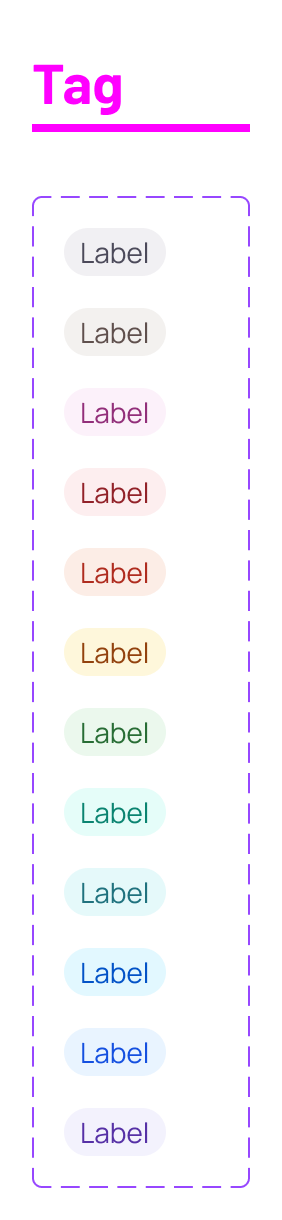
- Tags are used to display static information such as metadata or system-defined status. They are purely visual, non-interactive components intended to convey meaning or context without inviting user action. Tags can be styled for semantic emphasis but cannot be selected, removed, or activated.
- Chips are used to display and manage user-interactive items such as selections or entities. They are interactive components intended to support selection or action, with an optional remove button. Chips provide hover and focus affordances to communicate interactivity.
Importantly, this separation preserved the improvements introduced during the unified exploration. Interaction type—selection versus action—remained explicit within the chip component, and removal continued to be treated as an optional affordance rather than a defining characteristic. What changed was the scope of responsibility: static and interactive patterns were no longer forced to coexist within a single component abstraction.
This final structure struck a better balance between flexibility and clarity. It aligned more closely with how designers naturally reasoned about the interface, simplified the Figma component model, and resulted in cleaner interaction specifications and documentation boundaries.

Lessons learned
- Interaction count is not a durable mental model. Modeling interaction type helped, but clarity came from a higher-level boundary designers recognized immediately.
- Prioritize design system users over external precedent. Other systems helped frame the space, but the best decisions came from validating with product scenarios and designer feedback.
- Clear boundaries reduce redundancy and simplify guidance. Defining tag as static and chip as interactive let us fold “status tag” into tag without keeping a third overlapping component.
Next steps
Had the work continued, the next steps would have focused on taking the refined model from spec to adoption:
- Finalize the split Figma components for tag and chip, with clear examples for common scenarios such as system-defined status, semantic styling, selectable chips, and actionable chips.
- Support engineering implementation. Validate behavior against the interaction specs and resolve edge cases as they surface.
- Strengthen “when to use” guidance with real scenarios, especially filters, selected values in inputs, metadata labels, and status indicators, with lightweight migration notes for mismatches.